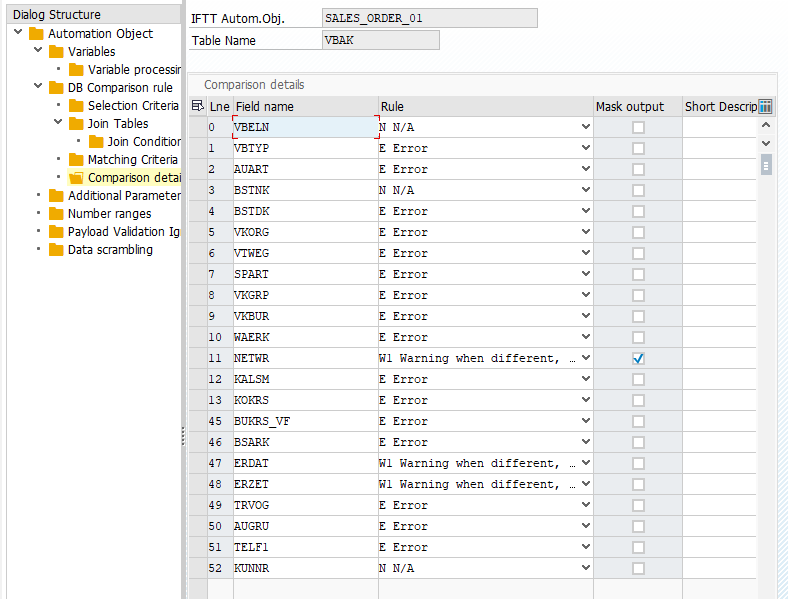
Comparison details
USE:
The comparison of reference and the new document is based on table and field level. Finally, when the definition contains tables and the logic of how rows from the tables will be fetched, it is time to specify fields from each table that will be compared.
PROCEDURE
For each step and corresponding table, the fields need to be specified
Select row with a particular step
Double click on Comparison Details
Define a list of fields and the treatment when the difference is found. Please define for each database field following attributes:
Description | Example | |
|---|---|---|
Line Number | Display order | 10 |
Field name | Field of the document for which we want to define an assertion rule. | VBTYP |
Rule | Assertion rule. Possible values: | |
| The database fields are ignored while performing assertions. They are displayed in the results, but they are not marked with any color. | |
| Suppose the values within the compared database fields differ. In that case, the fields are marked with yellow color on the results screen, indicating "warning". If there are no values within compared database fields, the fields are marked red, meaning "error". | |
| Suppose the values within the compared database fields differ. In that case, the fields are marked with red color on the results screen, indicating "error". If there are no values within compared database fields, the fields are marked red, meaning "warning". | |
| If the values within the compared database fields differ, the fields are always marked with yellow color indicating "warning". | |
| always error when values are different | E |
| In case compared DB values are different IFTT compares them with specified variable. If reference/current value pair from DB comparison matches variable values result is marked as "warning". Variable name used for checking the values has to be specified in the Processing Parameter column | |
| In case compared DB values are different IFTT compares them with specified values in the Mapping Object. If reference/current value pair from DB comparison matches mapping values result is marked as "warning". Mapping Object name used for checking the values has to be specified in the Processing Parameter column. Mapping object and values are configured in /INT4/IFTT_IMG → Landscape configuration → Define Mapping Objects | |
Mask Output | hide the field entry in test results | |
Short Description | optional description | item type |
Processing Parameter | Placeholder for additional parameter values required by some of the rule types |
EXAMPLE: