
SolMan
General information
Scenario | SOLMAN | |
|---|---|---|
Implementing class | /INT4/IFTT_CM_SOLMAN | |
XSLT1 | Incident Guid request | |
XSLT2 | System Guid Request | |
XSLT3 | Request creating incident | |
XSLT4 | Request reading incident status | |
XSLT5 | Request closing incident | |
XSLT6 | Request adding infos (texts and urls) to the incident |
ICT_SERVICE_DESK_API Configuration

To enable the integration between int4 Suite and SolMan, it is required to activate the ICT_SERVICE_DESK_API service in SICF.
Please follow the necessary steps outlined in the links provided below:
Go to the transaction SPRO and go to SAP Solution Manager → Capabilities (Optional) → IT Service Management → External Integration → External Service Desk → Web Service - based Configuration:
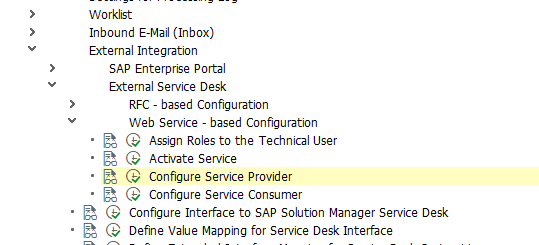
Create the technical user that will be used to call the web service and assign the following roles:
SAP_CM_MANAGED_ADMIN
SAP_SMWORK_CHANGE_MAN
SAP_SMWORK_INCIDENT_MAN
SAP_SMWORK_SM_ADMIN
SAP_SUPPDESK_CREATE
SAP_SM_CRM_UIU_SOLMANPRO
SAP_SM_CRM_UIU_SOLMANPRO_CREA
SAP_SM_CRM_UIU_SOLMANREQU
Make sure you have activated service ICT_SERVICE_DESK_API in the transaction SICF
Configure the service provider for the service ICT_SERVICE_DESK_API in SOAMANAGER
Configure the Service Consumer. If the application has the SOAP API, provide the WSDL

Add a new entry in table ICT_SYSCONF via tcode ICTCONF:
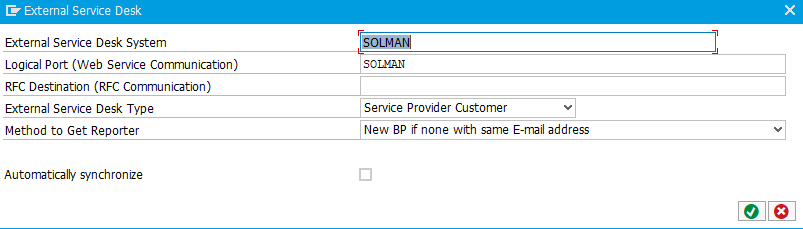
Logical port - port you defined in step 4 of activating ICT_SERVICE_DESK_API
Name - type any name you like
Define value mapping:
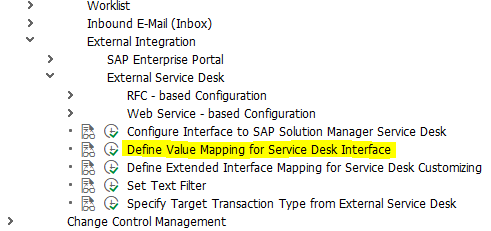
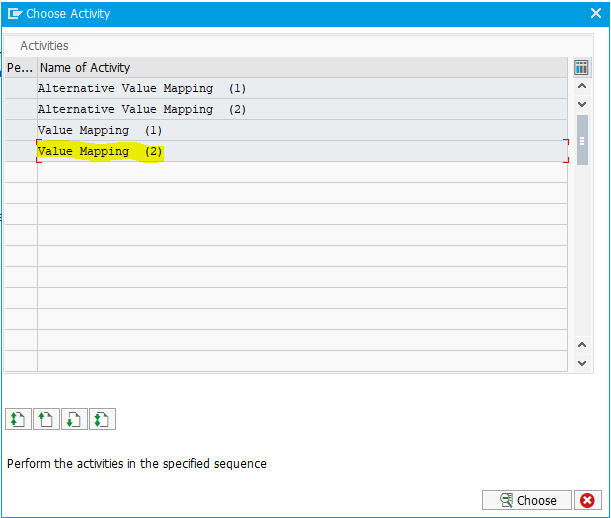
Fill all the entries as provided on the screenshot:
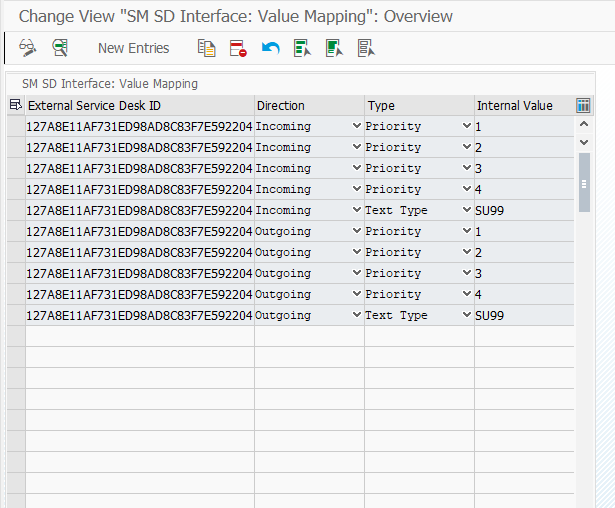
External Service Desk ID is the GUID from ICT_SYSCONF.
XSLT Configuration
To send valid requests to SolMan ICT_SERVICEDESK_API, you need to configure XSLTs
in the transaction /INT4/IFTT_IMG → Run Configuration wizard → Maintain Change Management Integration.
Add a new record:

You need to upload the appropriate XSLTs to their corresponding fields. The significant benefit is that users can modify the information sent to SolMan by adjusting the XSLTs.
XSLT1 | No configuration | |
|---|---|---|
XSLT2 | No configuration | |
XSLT3 |
Remember, that <IctPerson> has to exists and all the fields <PersonId> and <Langauage> have to contain the same values. | |
XSLT4 | NECESSARY: Insert generated Guid from ICT_SYSCONF into <SystemGuid> field | |
XSLT5 | NECESSARY: Insert generated Guid from ICT_SYSCONF into <RequesterGuid> field Regarding the rest of the fields - refer to the XSLT3 description | |
XSLT6 | NECESSARY: Insert generated Guid from ICT_SYSCONF into <RequesterGuid> field Regarding the rest of the fields - refer to the XSLT3 description |
Usage
When you go to SolMan to the specific incident:
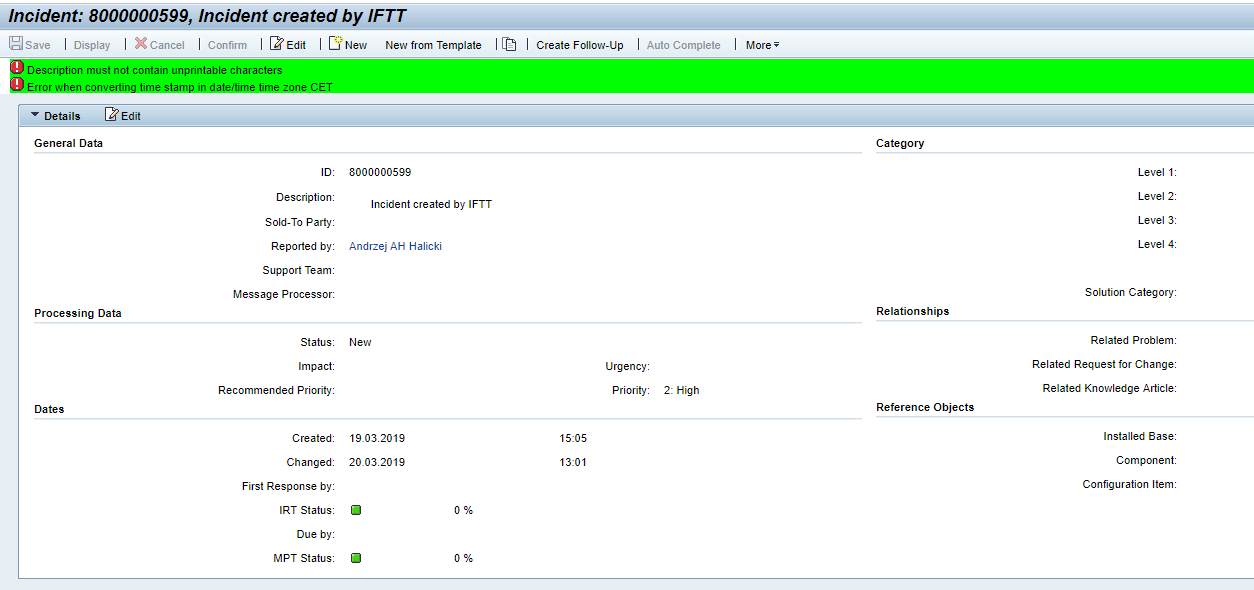
In Description you will see what was typed in <ShortDescription> in ProcessIncident.xslt.
Reported by is assigned to <PersonId> in ProcessIncident.xslt
Priority is <Priority> in ProcessIncident.xslt
In text section you will see Information typed in <Texts> → <item> in ProcessIncident.xslt when incident is created, in AddInfo.xslt when incident is updated:
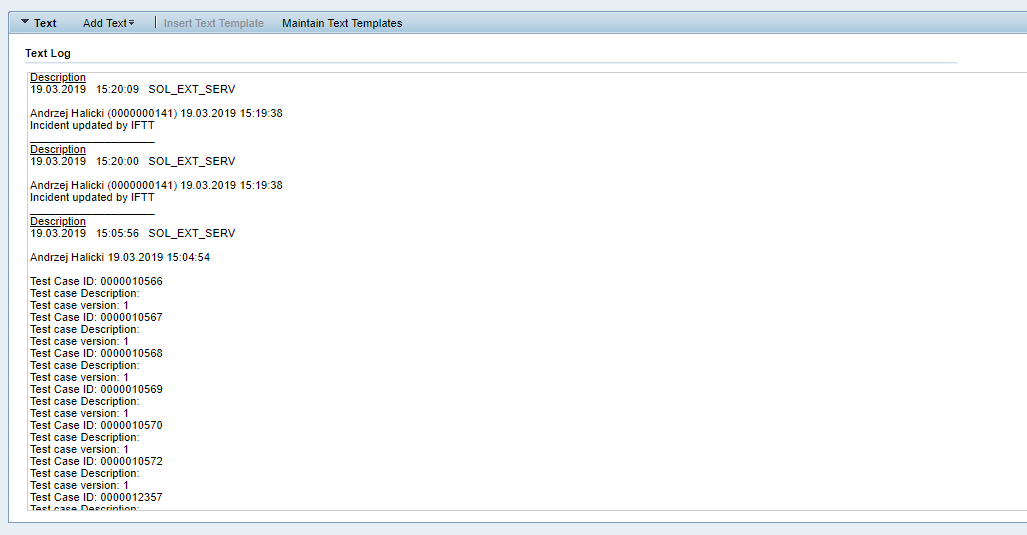
SOL_EXT_SERV is a technical user defined earlier
0000000141 is <PersonId> from the request
In the Attachments section, you will see URLs linked to test case report in int4 Suite:
