
License: Included in Int4 Shield Lite
Overview
What you can do in Int4 Suite depends on two things: your permissions, which an administrator grants through roles, and the licence installed on the server, which Int4 issues to your organization. The licence switches product capabilities on for the whole installation — for example SAP Integration Suite testing, the crawlers or the AI assistant — and can set limits. Permissions then decide who may use what the licence allows.
A licence is a signed file. It names your organization, an expiry date and an edition (a predefined bundle of capabilities and limits), and it can add further capabilities or limits on top of the edition. Int4 Suite checks the signature on every use, so a licence file cannot be altered.
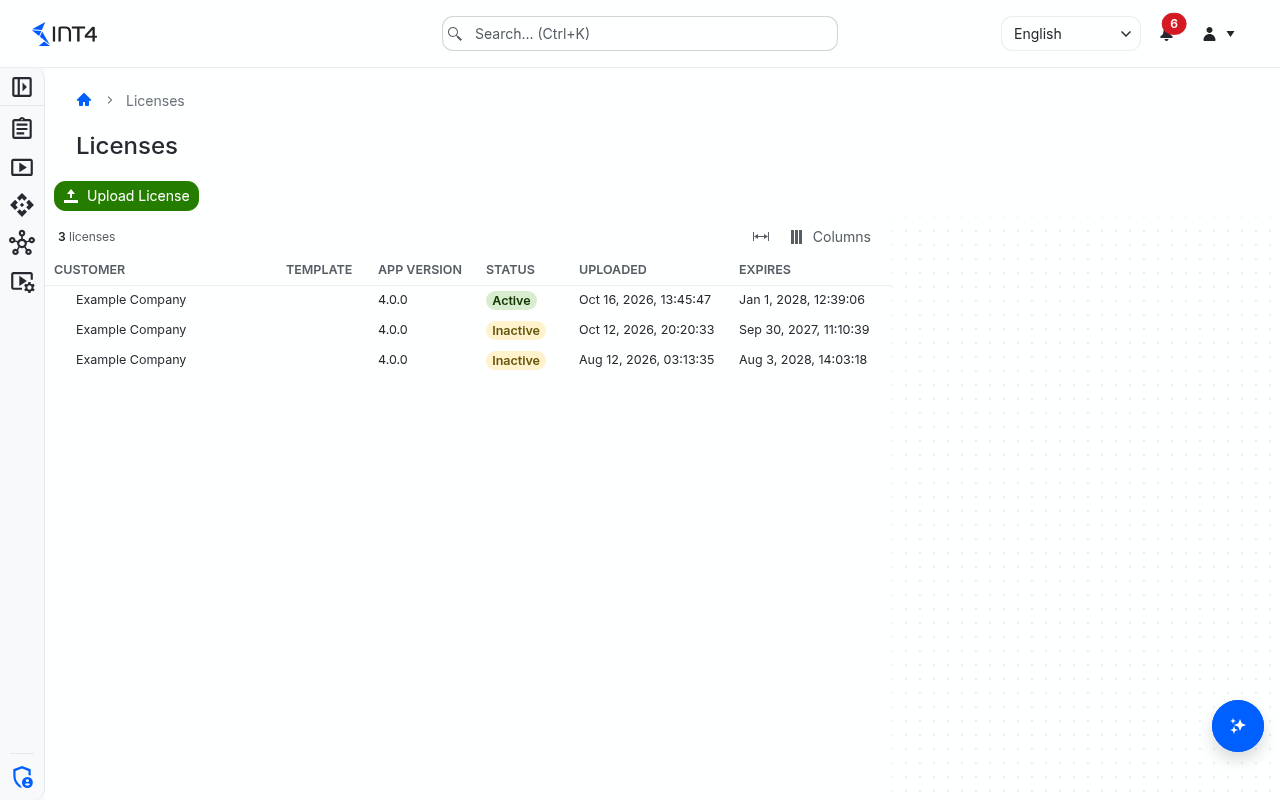
The Licenses screen is where you install a licence file and see the licences uploaded so far. Exactly one licence is active at a time; every earlier upload stays in the list as history. To see in detail what the active licence includes, open your profile (Profile in the user menu, top right) — its License card lists the edition, every licensed capability and every limit. See Profile.
Each edition is shaped around a purpose. A capability you do not see may simply belong to a different edition rather than being broken. The entry edition, for example, is built for one project type — migrating from SAP PI/PO to SAP Integration Suite — and leaves out features meant for broader day-to-day testing.
Open the screen from IAM → Licenses.
Tasks
How to install or replace a licence
-
Click Upload License in the toolbar. A file picker opens that offers
.licensefiles. -
Select the licence file you received from Int4.
-
When the file is accepted, the list refreshes: the new licence is at the top with Active, and the previously active licence turns Inactive.
The new licence applies to everyone immediately. Other people who are already signed in see newly licensed screens after a page reload or within a few minutes.
If the list does not change, the file was not accepted and the previous licence stays active. A file is refused when:
-
it is not a valid licence file, or its signature does not match;
-
it was signed with a key this version of Int4 Suite does not know yet — update Int4 Suite first;
-
the licence or its signing key has been revoked;
-
it has already expired;
-
it names an edition this version of Int4 Suite does not contain.
How to find out what is licensed
-
Open Profile from the user menu.
-
Read the License card: Licensed to, Edition, Expires, Licensed features and Limits.
Every signed-in user can see this card; no licence permission is needed.
How to renew an expiring licence
Ask Int4 for a new licence file before the date in Expires and upload it as described above. There is no grace period: at the moment of expiry all licensed capabilities stop working until a valid licence is uploaded.
Editions
|
Edition |
Included capabilities |
Limits |
|---|---|---|
|
Int4 Suite Enterprise |
Every capability except the two outside the editions (below). |
none |
|
Int4 APITester |
Everything in Int4 Suite Enterprise except Messenger. |
none |
|
Int4 Shield |
Everything in Int4 Shield Lite, plus Performance testing, Manual test case creation, Test case payload editing, Virtual folders, Test case analysis, SAP Integration Suite TPM testing and SAP Integration Suite crawler. |
none |
|
Int4 Shield Lite |
Test case management, Test execution, Test reporting, AI assistant chat, AI test case indexing, API testing, Integration platform testing, Test data dynamization, File comparison, SAP PI/PO testing, SAP Integration Suite testing, SAP PI/PO crawler |
Maximum systems under test: 10; SAP PO test-case execution window (days): 14 |
|
Int4 Messenger |
Messenger, AI assistant chat, MCP server, AI test case indexing, API testing, Integration platform testing, Test data dynamization, SAP PI/PO testing, SAP Integration Suite testing. No test case management. |
none |
|
Custom |
A licence without an edition: exactly the capabilities and limits written into the file. |
As written into the file. |
Any licence can add capabilities to its edition and can override the edition's limits. Instance transfer and AI master data import are in no edition: a licence includes them only when it names them. Int4 Shield Lite is for SAP PI/PO to SAP Integration Suite migrations. It leaves out Manual test case creation, Test case payload editing and the SAP Integration Suite crawler: test cases are captured from real messages rather than written by hand. Because the content of an edition ships with Int4 Suite, an update can add capabilities to your edition without a new licence file.
Licensed capabilities
The Licensed features list on your profile uses these names. Capabilities without a display name appear there with their technical name, shown here in code format.
|
Capability |
What it unlocks |
|---|---|
|
Test case management |
Working with test cases, including the test case loader. |
|
Test execution |
Running tests. |
|
Test reporting |
Test run results, the dashboard and live run status. |
|
Performance testing |
Performance test runs. |
|
Manual test case creation |
Creating test cases by hand and uploading their messages. Without it, test cases are created from captured messages (SAP Integration Suite test cases only by migration). |
|
Test case payload editing |
Editing the messages of a test case. |
|
|
Saved searches. |
|
|
Test case analysis (Analysis under Test Cases). |
|
Process testing |
Processes and parent/child links between test cases. |
|
Companion apps |
Companion apps. |
|
Instance transfer |
Exporting, importing and wiping a whole installation with the operator commands. In no edition: only a licence that names it includes it. |
|
AI assistant chat |
The AI assistant, AI help in the test case loader and script suggestions. |
|
MCP server |
The Int4 Suite MCP server, for AI clients outside Int4 Suite. |
|
Integration platform testing |
Umbrella for integration platform testing; the platform capabilities below decide what is actually available. |
|
Test data dynamization |
Global sequences and the Data Store. |
|
File comparison |
File Comparator automation objects. |
|
Printout testing |
Comparing PDF printouts, on top of File comparison. |
|
SAP PI/PO testing |
SAP PI/PO systems under test and the SAP PO Injection, SAP PO Capture and SAP PO Synchronous automation objects. |
|
SAP Integration Suite testing |
SAP Cloud Integration systems under test and the SAP CI Injection, SAP CI Capture and SAP CI Micro Unit Test automation objects. |
|
SAP Integration Suite TPM testing |
SAP CI TPM Injection and SAP CI TPM Capture automation objects and Trading Partner Management crawlers, on top of SAP Integration Suite testing. |
|
Solace PubSub+ testing |
Solace PubSub+ systems under test and the Solace PubSub+ Injection and Solace PubSub+ Capture automation objects. |
|
SAP Advanced Event Mesh testing |
SAP Advanced Event Mesh systems under test and the SAP Advanced Event Mesh Injection and SAP Advanced Event Mesh Capture automation objects. |
|
SAP Event Mesh testing |
SAP Event Mesh systems under test and the SAP Event Mesh Injection and SAP Event Mesh Capture automation objects. |
|
Database validation |
SAP DB Comparator automation objects. |
|
Business objects |
Business Object automation objects. |
|
|
IDoc Injection and IDoc Capture automation objects. |
|
|
Proxy Injection and Proxy Capture automation objects. |
|
|
RFC Check, RFC Call and NAST Injection automation objects. |
|
|
HTTP Call automation objects. |
|
SAP AIF testing |
AIF Injection automation objects. |
|
UI testing |
UI tests on SAP GUI for HTML, SAP GUI for Java and SAP Fiori. |
|
Authorization testing |
Authorization tests, an extension of UI testing. |
|
|
The API Explorer. |
|
|
Messenger and External Channels. |
|
SAP PI/PO crawler |
Crawlers for SAP PI/PO. |
|
SAP Integration Suite crawler |
Crawlers for SAP Cloud Integration. |
|
|
Business object crawlers (together with Business objects). |
Limits:
|
Limit |
Meaning |
|---|---|
|
Maximum systems under test |
How many systems under test the licence is meant for. |
|
SAP PO test-case execution window (days) |
How many days after its creation an SAP PI/PO test case can still be run. Older test cases are refused at run time. Without this limit there is no window. |
When a capability is not licensed, its menu entries are hidden, opening its pages shows "You don't have access to this page", and the matching choices — for example a system or automation object type — are not offered or are refused with a message naming the missing capability.
Field reference
|
Column |
Description |
|---|---|
|
Customer |
The organization the licence was issued to. |
|
Template |
The edition the licence is based on, shown by its technical name (for example |
|
App Version |
The Int4 Suite version the licence was issued for. |
|
Status |
Active for the licence in effect; Inactive for earlier uploads. |
|
Uploaded |
When the file was uploaded to this installation. |
|
Expires |
When the licence stops working. |
Tips & edge cases
-
Uploading is the only way to change licences. There is no separate activate or deactivate action, and licences cannot be deleted from the list.
-
Without a valid licence the installation stays usable for administration. You can always sign in, manage users and roles, and upload a licence; licensed capabilities stay unavailable until then. The profile's licence card then says No active license is installed. Licensed features stay unavailable until a valid license is uploaded.
-
An update can retire a licence. If Int4 revokes a licence or a signing key, an Int4 Suite update that contains the revocation makes the affected licence stop working; upload a replacement.
-
Licence and permissions are separate. A licensed capability still needs the matching permission, and a permission does nothing for a capability that is not licensed.
Related features
-
Profile — the licence card and your own access.
Prerequisites & permissions
About permissions. What you can see and do is decided by the roles assigned to your user. Each role bundles permission groups, and each permission group allows activities — Read, Write, Delete, Execute and, for schedules, Change owner — on a kind of record (for example Test Case, Automation Object, System Under Test). A role grants its groups per project scope, so you may be allowed to change records in one project but only view, or not see, those of another.
If a button is disabled, a page says you don't have access, or a list comes back empty, missing permissions are the most likely cause — or, for whole product areas, the installed licence. You can review your own access under Profile → My access; an administrator can change your roles under IAM → Users.
-
License: Read — to open this screen. Without it you are taken to an access-denied page.
-
License: Write — to upload a licence. Without it Upload License is disabled.
In the shipped roles, both come with the Administrator role (permission group "Manage licenses").