
USE:
This section will guide you through creating a test case that you can use to test the back-end without testing the middleware. On the back-end side, the incoming message results in the creation of a transactional document.
PREREQUISITES:
-
You have completed the steps described in the General rules for a test case creation.
-
In the case of testing the AIF interface, an AIF configuration is required.
-
In case of testing Web Services or REST services enabling ICF Recorder is a prerequisite for storing request and response payloads.
PROCEDURE:
|
AIF Inbound |
IDOC Inbound |
Proxy Inbound |
Web Service / REST Service |
|---|---|---|---|
|
1. Select "AIF Inbound" for the Interface Type field. |
1. Select "IDOC Inbound" for the Interface Type field. |
1. Select "PROXY Inbound" for the Interface Type field. |
|
|
2. In the Document Number field, provide the GUID used as a test base. 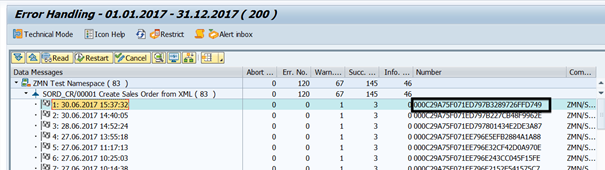
(a) To find proper GUID, open AIF Monitor in transaction /n/AIF/ERR.
|
2. In the Document Number field, provide the IDoc number used a test base. |
2. In the Document Number field, provide the Proxy GUID used as a test base. As the message comes directly to ERP, omitting the middleware, Proxy GUID should be fetched from sxi_monitor |
2. In the Document Number field, provide the Message ID from the SICFRECORDER transaction. 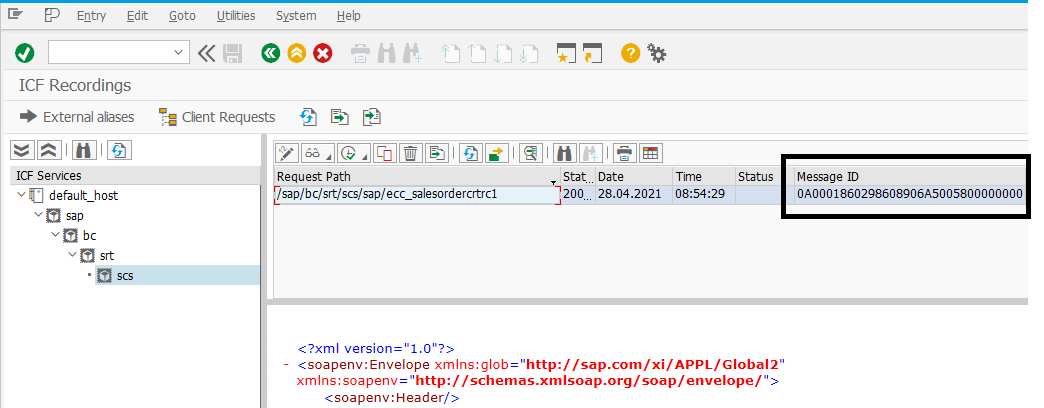
|
Now, save the test case. After saving, the Object Def. ID should be updated automatically with relevant Object Definition ID. The test case is ready to be executed.