
This section describes how Authorization Groups are applied to and interact with Automation Objects within Int4 APITester.
1 Assigning Authorization Groups to Automation Objects
-
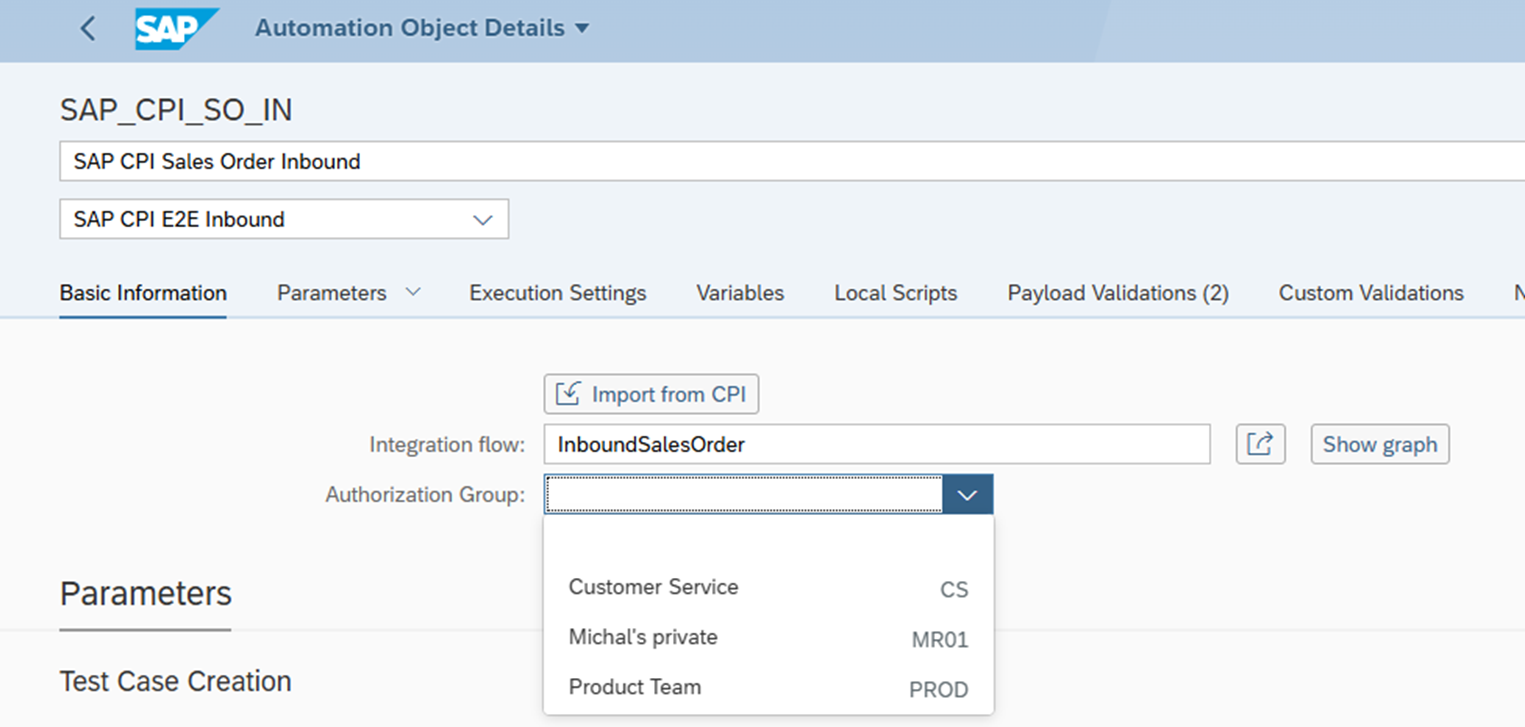
Location: The Authorization Group can be assigned in the Fiori Launchpad, within the 'Automation Objects' application. It's available in the 'Basic Information' section.
-
How to Assign: The Authorization Group can be selected from the dropdown list in the 'Basic Information' section when creating or editing an Automation Object.
-
Inheritance: Automation Objects do not inherit Authorization Groups. Access is controlled solely by an explicit assignment to the object itself.
2 Authorization-Protected Actions for Automation Objects
The following actions performed on Automation Objects are protected by Authorization Groups:
-
Edit/Change:
-
Description: Modifying the Automation Object's properties, script, or configuration.
-
Required Authorization:
/INT4/AGRwith activity02(Change) for the assigned Authorization Group.
-
-
Delete:
-
Description: Removing the Automation Object from the system.
-
Required Authorization:
/INT4/AGRwith activity06(Delete) for the assigned Authorization Group.
-
-
Create:
-
Description: Creating a new Automation Object.
-
Required Authorization:
/INT4/AGRwith activity01(Create) for the desired Authorization Group of the new object.
-