
License: Included in Int4 Suite Enterprise and Int4 APITester · Partly in 3 licenses
License details
|
Feature or limit |
Int4 Suite Enterprise |
Int4 APITester |
Int4 Shield |
Int4 Shield Lite |
Int4 Messenger |
|---|---|---|---|---|---|
|
SAP PI/PO testing |
|
|
|
|
|
|
SAP Integration Suite testing |
|
|
|
|
|
|
SAP Integration Suite TPM testing |
|
|
|
|
|
|
IDoc testing |
|
|
|
|
|
|
Proxy testing |
|
|
|
|
|
|
RFC testing |
|
|
|
|
|
|
SAP AIF testing |
|
|
|
|
|
|
HTTP testing |
|
|
|
|
|
|
File comparison |
|
|
|
|
|
|
Database validation |
|
|
|
|
|
|
Business objects |
|
|
|
|
|
|
Solace PubSub+ testing |
|
|
|
|
|
|
SAP Advanced Event Mesh testing |
|
|
|
|
|
|
SAP Event Mesh testing |
|
|
|
|
|
|
UI testing |
|
|
|
|
|
Anything a license model does not include can be added through a custom license. The license installed for you is shown in the app under Profile → License. All features by product version
Overview
An Automation Object is a reusable blueprint that tells Int4 Suite how to drive one specific integration scenario end-to-end: which middleware to talk to, how to send a payload in, where to find the resulting message, what to validate, and how to compare actual versus expected output. Every test case is bound to exactly one automation object — the test case supplies the payloads and the expected data, the automation object supplies everything else.
This split — keeping the configuration in the automation object and the test data in the test case — is the heart of how Int4 Suite is meant to be used. Because the automation object holds everything that is shared by an interface or object under test (how to send, what to validate, how to manipulate data), a single automation object is normally reused across many test cases: one for each captured document or message you want to replay. You configure the scenario once, then point as many test cases at it as you need.
The same separation is what lets one test case be retargeted at a different system without rebuilding its automation object. Most validations come down to a single comparison: a reference payload (captured when the test case was created — the "before") against a current payload (produced by this execution — the "after"). Keeping these two sides independent is what makes one automation object equally suited to regression testing (same system, before and after a change), migration testing (the reference comes from the old system, the current from the new one — for example an ECC-to-S/4HANA move), and test-driven development. In every case the comparison logic is identical; only which systems supply "before" and "after" changes.
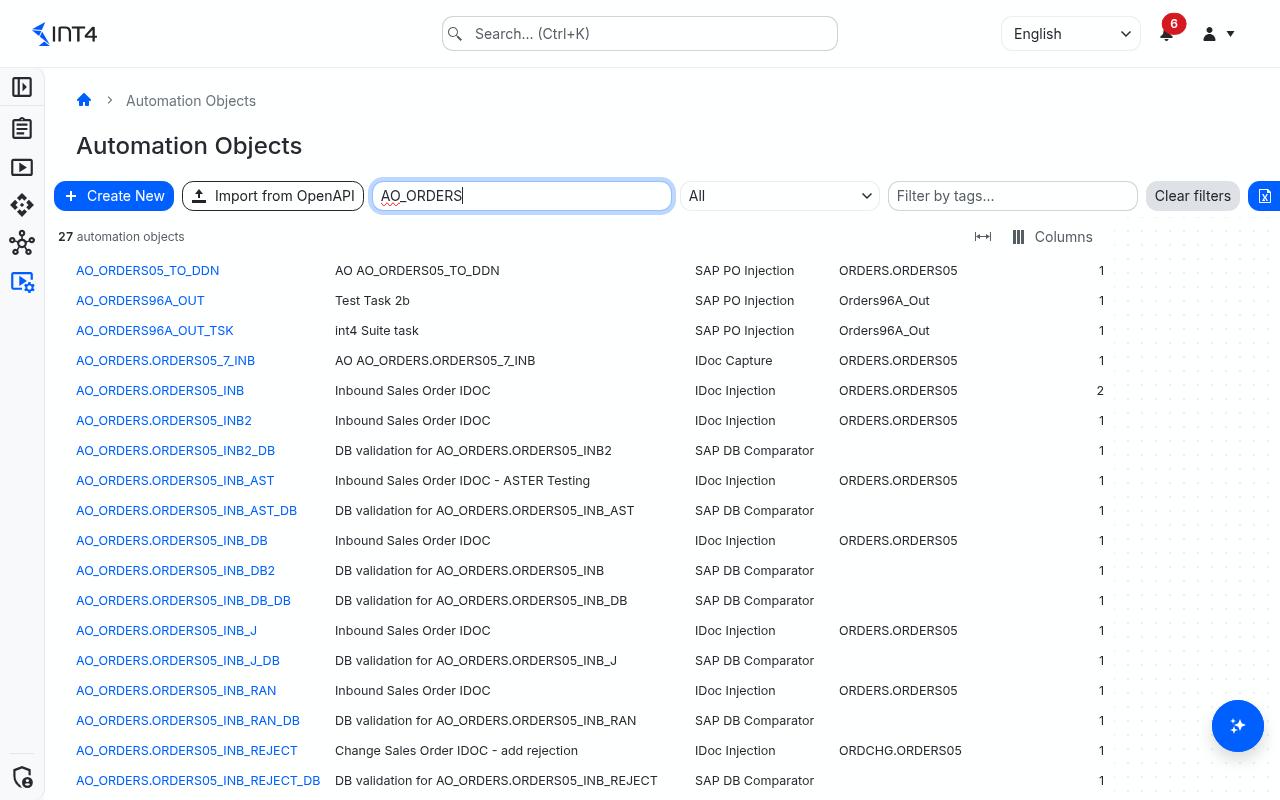
This page is the central inventory. From here you can browse every automation object you have permission to see, filter the list by type, tag or free-text search, jump into one to view or edit its details, start a new automation object, or import a batch of them from an OpenAPI specification. The list is paged and exportable.
Each automation object has a type that pins it to a specific platform and test pattern — for example SAP CI Injection drives an inbound iFlow on SAP Cloud Integration, SAP PO Injection injects messages into an SAP PI/PO landscape, SAP DB Comparator checks database tables on an SAP backend, and Business Object drives a custom scenario you have scripted yourself. The type is locked at creation and the rest of the form re-shapes itself around it; the Type column on the list shows the type at a glance.
Names are short identifiers (1–40 characters: letters, digits, ., - and _, starting with a letter or digit) and must be unique across all currently-active automation objects, regardless of upper or lower case (Orders and ORDERS count as the same name). Two existing automation objects with the same name cannot both be the current version at the same time.
Tasks
How to create a new automation object
-
Click Create New in the toolbar above the list. The button is disabled if you do not hold the Automation Object: Write permission in any project scope.
-
Under General, pick the Type first — the rest of the editor re-shapes itself around it (see Types of automation objects). Types your licence does not cover are greyed out.
-
Enter the Name, and optionally a description, project scope, version description and tags.
-
If the type asks for it, fill in the interface details — depending on the type this is the iFlow, the IDoc type, the AIF interface or the interface name and namespace. For SAP CI types you can then let Autofill fill in the parameters (see below).
-
Fill in the type-specific settings under Parameters and, as needed, the other sections described in The automation object editor.
-
Watch the Checklist on the right: it lists every required field and every broken reference, and turns green as you complete them.
-
Click Save. The new automation object is saved as version 1; every later save creates version 2, 3 and so on.
How to pre-fill SAP CI parameters with Autofill
For SAP CI Injection, SAP CI Capture and SAP CI Micro Unit Test, Int4 Suite can read the iFlow and propose the adapter and block parameters.
-
While creating or editing the automation object, enter the iFlow (use the search button to pick it from a tenant).
-
Click Autofill, choose the system under test to read the iFlow from, and click Go.
-
Review the filled-in parameters, adjust them if needed, and save.
You need permission to run actions against the chosen system under test.
How to describe where business values live (business dimensions)
Business dimensions name the business values an interface carries — a sales order number, a plant, a material — and say where each one sits in the payloads. Message finding, validation rules, payload matching, processing pipelines and process suggestions all build on them.
-
In edit mode, open Business Dimensions and click Add dimension.
-
In Dimension, pick a dimension from the Business Dimensions catalog, or type a new code in UPPER_SNAKE_CASE. A code that is not in the catalog becomes a dimension local to this automation object (marked as local).
-
Optionally set the Role type — Primary for the value that identifies the business object this interface handles, Secondary for another identifier or a reference to another object, Business data for values that describe it, Other for anything else. Process suggestions use it.
-
Expand the row and click Add Locator for every payload the value can be read from. For each locator choose the Source Payload (source, expected, actual) and its Index, the Message Part where the type offers several (payload, header, properties, attachment), the Expression Type (XPath, JSONPath, Regex or Aster Script) and the Expression. For catalog dimensions, suggested expressions are offered; the magnifier button lets you test an expression.
-
Click Validate against samples to try all locators — including unsaved changes — against the automation object's sample payloads (available once the automation object has been saved). A dot per dimension and per locator shows whether every sample, some samples or no sample produced a value; click a dimension's dot to see the values found per test case.
-
Save the automation object.
To start from a predefined set, click Load from template, pick at least one format tag and one message tag (for example an IDoc format and an ORDERS message), and click Load. Matching catalog dimensions are added with their locators and role; codes already present are skipped.
The Selector parameter column shows which message selector parameter a dimension fills when a process step is looked up next to a test case carrying that value. It is display-only in the editor.
How to change payloads automatically (processing pipelines)
Processing pipelines decide what happens to business values and payloads, and when. Typical uses: give every run a fresh purchase order number, carry a document number from a parent test case into its child, or ask the tester for a value on each test case.
-
In edit mode, open Processing Pipelines and click Open pipelines editor.
-
The editor shows one line per phase: Save (when a test case is saved), Prepare Input (before the message is sent) and Process Output (after the result was read). Drag blocks from the Toolbox onto a phase:
-
Extract — read a dimension's value from a payload.
-
Generate — create a new value with a generator.
-
Patch — write a value (or a template such as
PO-{{PO_NUMBER}}) into a payload. -
Replace — read, generate and write back in one step, for example "replace the purchase order number with the next number of a sequence".
-
Read User Dimension — use a value the tester enters on each test case.
-
Read Parent Dimension — take a value from the parent test case.
-
-
Open a block to set its dimension and options. Generators are Sequence, Random Integer, UUID, Date/DateTime, Constant, Aster Script and Mapping Object (translates the value between environments through a mapping object).
-
Click Check to find problems, then Apply. You can switch to JSON to edit the pipeline as text.
-
Save the automation object — the pipeline is stored only then.
How to control the comparison
-
Validation Rules — click Add Rule and point an XPath, JSONPath or Regex expression at the part of the payload the rule is about. The Difference Handling decides what a difference there means:
Difference handling
Effect
Ignore
Differences are dropped from the result (for example a timestamp or message ID).
Warning
Differences are reported as warnings and do not fail the test.
Warning (Mapping Object)
A warning only when the chosen mapping object lists the expected/actual pair; otherwise an error.
Warning (Business Dimension)
A warning only when the difference is exactly the value the pipeline replaced for the chosen business dimension.
Warning (Error when actual empty) / Error (Warning when actual empty)
Warning or error, swapped when the actual value is empty.
Warning (Pattern on expected) / Warning (Pattern on actual)
A warning when that side's value matches the pattern in full; use
{ACT}or{REF}for the other side's value, for example0000{ACT}to accept added leading zeros. XPath and JSONPath only.
Every difference not covered by a rule is an error.
-
Payload Matching — when one input produces several outputs in no fixed order, matching rules pair each expected message with the right actual message before comparing. Rules in the same Group must all match; any group may match. The Rule Type compares the values exactly, against a business dimension, or through a mapping object.
-
Message Finding — for types that look for a message instead of sending one, click Add Expression and say where to read a value from the candidate message and which Business Dimension it must match, with an optional Match Pattern (
{{value}}stands for the dimension's value). Max Candidates limits how many candidate messages are inspected. -
Comparison settings in the type parameters — Output Comparator (auto-detect, XML, flat file, JSON), Strict Encoding (fail when the two payloads use different character encodings), Allow Namespace Prefix Changes, child pairing rules for repeated XML segments (for example match
E1EDKA1partner segments byPARVWinstead of by position), and flat-file line separators.
How to add your own checks (local scripts and custom validations)
-
Save the automation object once, then open it in edit mode.
-
Under Local Scripts, click Add local script, give the script an ID and write it in the Aster editor. You can pick a test case for sample data and click Run to try it. Local scripts belong to this automation object only and can be used by its locators, pipelines and custom validations.
-
Under Custom Validations, click Add validation and pick a global or local script. It runs on the whole output of every execution and must return true, otherwise the test fails.
-
Save the automation object. Script changes become part of the automation object only when you save it; each version remembers exactly which script versions it used.
If you leave edit mode without saving, script edits are kept as drafts. Next time you edit, the editor opens the saved version and offers Revert to draft or Discard draft.
How to choose sample payloads
Sample payloads are up to 10 test cases of this automation object whose payloads are used as real data while you set up dimensions, rules and pipelines.
-
They are picked automatically from the automation object's test cases that have payloads, preferring test cases that passed or completed a run.
-
Under Sample Payloads (edit mode) you can Add test case, pin an entry so it survives a reset, remove an entry so it is never picked again, or Reset selection the automatic selection. Preview payload shows a test case's payloads.
-
These changes are saved immediately and do not create a new version. You only see test cases you are allowed to read.
How to import automation objects from an OpenAPI specification
Turn an API specification — for example one downloaded from the SAP Business Accelerator Hub — into one HTTP Call automation object per operation.
-
On the list, click Import from OpenAPI.
-
Under OpenAPI specification, choose the Specification file — an OpenAPI 3.x or Swagger 2.0 file in JSON or YAML, up to 10 MB.
-
Optionally enter a Name prefix (put in front of every proposed name), a Project scope and Tags for all created objects. Tick CSRF token handling when the service needs a CSRF token before POST, PUT, PATCH and DELETE calls, as SAP OData services do.
-
Click Parse specification. The specification's title, version, operations and any warnings (for example skipped references) appear.
-
Check the Base path: it is put in front of every URL path, relative to the HTTP system under test, and is pre-filled from the specification's server URL.
-
Select the operations to import. Edit a proposed name in the Automation Obj. column if needed. The Status shows Ready, Name conflict (an automation object or another selected row has that name), Invalid name or Deprecated (can still be imported).
-
Click Create
countautomation objects. All selected objects are created together, or none if one of them has a problem; the problems are listed at the top of the page. Up to 500 operations can be imported at once.
What the import fills in for each operation: the HTTP method, the URL path, required query parameters, the content type and required headers (never authorization headers — those come from the system under test), and a CSRF token fetch where needed. Path parameters such as /SalesOrder/{SalesOrderID} become business dimensions (shown in the Path parameters column): the path keeps a {{SALES_ORDER_ID}} placeholder and each test case asks for the value. The import never downloads files the specification refers to; unsupported references are skipped with a warning.
How to copy, restore or delete an automation object
-
Copy: open the automation object, click Copy and enter a New Name. The copy includes the parameters, local scripts and tags and starts at version 1. If you do not have write permission in the original's project scope, the copy is created without a project scope.
-
Restore an older version: under Versions, open an older version and click Restore This Version. Its content, including its local scripts, becomes a new current version.
-
Delete: click Delete and confirm. Deleting is refused while test cases still use the automation object; the message lists up to five of them.
The automation object editor
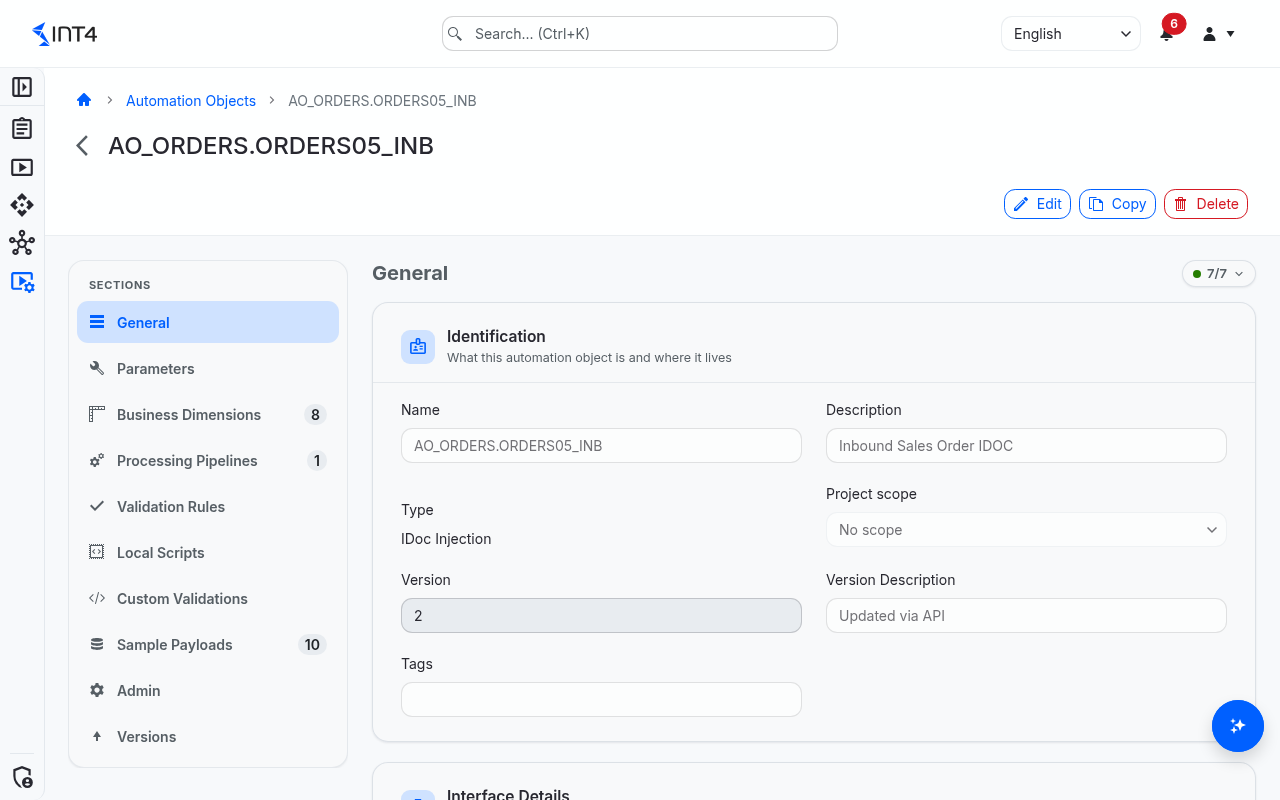
The detail page lists its sections in a navigator on the left and shows the Checklist on the right. Which sections appear depends on the type:
|
Section |
What it holds |
Shown for |
|---|---|---|
|
General |
Name, type, description, project scope, version, version description, tags; interface details where the type uses them |
All types |
|
Parameters |
The type-specific settings, including General Execution Parameters (debug log, read attempts, delays) |
All types |
|
Business Dimensions |
Business values and where they sit in the payloads |
All types except RFC Check |
|
Processing Pipelines |
Processing pipelines per phase |
All types except RFC Check |
|
Validation Rules |
Rules for differences |
Types that compare a payload (not RFC Check, NAST Injection, AIF Injection or the three broker injection types) |
|
Local Scripts |
Aster scripts owned by this automation object |
Saved objects, all types except RFC Check |
|
Custom Validations |
Scripts run on the whole output |
All types except RFC Check |
|
Payload Matching |
Pairing of several expected and actual messages |
SAP CI Injection, SAP CI Micro Unit Test, SAP CI TPM Injection, SAP CI TPM Capture, SAP PO Injection |
|
Message Finding |
How a produced message is recognised |
SAP CI Capture, SAP CI TPM Capture, SAP PO Capture, IDoc Capture, Proxy Capture and the three broker capture types |
|
Sample Payloads |
Test cases used as sample data |
Saved objects, all types except RFC Check and NAST Injection |
|
Admin |
Created/updated by and the audit log |
Saved objects |
|
Versions |
All versions; open one to view or restore it |
Saved objects |
The checklist re-checks the form as you type. Besides required fields it reports references that cannot work — for example a validation rule or message-finding expression naming a business dimension that no pipeline block fills, a pipeline block naming a dimension without a locator, or a locator on a message part this type never produces. Such errors also block saving.
Types of automation objects
The Type decides which integration scenario an automation object can drive. Pick the type that matches what you want to test — once an automation object exists, the type cannot be changed.
Most platforms come in pairs: an injection type sends a message into the system and checks what happens to it, a capture type sends nothing and instead finds and checks the message a system produced — usually as the child of a test case whose execution causes that message.
|
Type |
System under test |
What it does |
|---|---|---|
|
SAP CI Injection |
SAP Cloud Integration |
Sends a message into an iFlow and compares the outputs read from the iFlow trace |
|
SAP CI Capture |
SAP Cloud Integration |
Finds a message an iFlow sent and compares it |
|
SAP CI Micro Unit Test |
SAP Cloud Integration |
Tests a segment of an iFlow through a temporary copy |
|
SAP CI TPM Injection |
SAP Cloud Integration (TPM) |
Sends a B2B interchange into Trading Partner Management and compares the business documents it produces |
|
SAP CI TPM Capture |
SAP Cloud Integration (TPM) |
Finds an outbound B2B document and compares it |
|
SAP PO Injection |
SAP PI/PO |
Injects a message and compares every output message |
|
SAP PO Capture |
SAP PI/PO |
Finds an outbound message and compares it |
|
SAP PO Synchronous |
SAP PI/PO |
Sends a synchronous request and compares the response |
|
SAP DB Comparator |
SAP ABAP backend |
Compares database rows selected by a DB ruleset with a snapshot |
|
IDoc Injection |
SAP ABAP backend |
Sends an IDoc in or out and checks its status |
|
IDoc Capture |
SAP ABAP backend |
Finds an IDoc the system created and compares it |
|
Proxy Injection |
SAP ABAP backend |
Re-injects an ABAP proxy message |
|
Proxy Capture |
SAP ABAP backend |
Finds a proxy message the system created and compares it |
|
RFC Check |
SAP ABAP backend |
Checks an RFC destination |
|
RFC Call |
SAP ABAP backend |
Calls a function module and optionally compares the response |
|
AIF Injection |
SAP ABAP backend |
Transfers a message into SAP AIF |
|
NAST Injection |
SAP ABAP backend |
Re-triggers an SAP output (output control) |
|
HTTP Call |
HTTP |
Calls an HTTP, REST or OData endpoint and compares the response |
|
File Comparator |
none |
Compares two files |
|
Business Object |
from the SUT group |
Drives a scripted Business Object |
|
Solace PubSub+ Injection / SAP Advanced Event Mesh Injection |
Solace PubSub+ / SAP Advanced Event Mesh |
Publishes a message to a queue or topic |
|
Solace PubSub+ Capture / SAP Advanced Event Mesh Capture |
Solace PubSub+ / SAP Advanced Event Mesh |
Reads a published message back and compares it |
|
SAP Event Mesh Injection |
SAP Event Mesh |
Publishes a message to a queue or topic |
|
SAP Event Mesh Capture |
SAP Event Mesh |
Reads a published message back and compares it |
|
UI Test |
SAP ABAP backend |
Plays a UI test script on SAP GUI for HTML or the Fiori launchpad and checks what it reads |
Every type also has the General Execution Parameters: Debug Log, Attempts to Read the Result (1–60; raise it for integrations that take longer to produce output), and the two delays Delay for Each Test Case (seconds) and Delay Once per Test Run (seconds) (0–3600 seconds, used only by staggered test runs).
SAP CI Injection
License: Included in all licenses
When to pick this: you want to test a complete inbound iFlow on SAP Cloud Integration. Int4 Suite sends a request through the iFlow's sender adapter (HTTP, SOAP, ProcessDirect, SFTP, IDoc, XI, AMQP or JMS) and reads the input and output payloads back from the iFlow trace to compare them with the expected ones. The iFlow is entered under interface details.
|
Field |
What it means |
|---|---|
|
Input Payload Source and the matching block or attachment field |
Whether the input payload is read from a block of the iFlow or from an attachment, and which one. The search button lets you pick blocks from the iFlow diagram. |
|
Validate Output Message |
On by default. Off: outputs are neither read nor compared and the test passes once the message was sent. On: a missing expected payload and any difference in the number of expected and found outputs are errors. |
|
Output Payload Source and the matching field |
Read the outputs from one or more blocks, from attachments, or delegate to other automation objects (Output Automation Object). |
|
Adapter Type and its settings |
The sender adapter the iFlow listens on; a block of adapter settings appears — HTTP method, query and CSRF settings; SOAP action; ProcessDirect endpoint; SFTP directory, file, address, credentials and proxy type; Event Mesh host, queue, credential and content type for AMQP; JMS queue and content type. |
|
Validate Headers |
Also compare CPI headers and exchange properties, using the same validation rules. They are captured either way. |
|
Externalized Parameters |
Externalized iFlow parameters set before the run; browse them from the iFlow configuration. |
|
Variable Name as Application ID |
Send the value of this business dimension as the SAP application ID, so child test cases can find related messages. |
|
HTTP Headers |
Extra HTTP headers to send. |
|
Dispatcher Mode (overrides SUT default) |
Whether the Int4 dispatcher receives the message synchronously or asynchronously; empty uses the setting of the system under test. |
|
Comparison settings |
Output comparator, XML namespace tolerance, child pairing rules and flat-file separators. |
Tips:
-
If you choose Output Automation Object as output source, also pick at least one entry in Output Automation Object.
-
When header validation is on, values that change on every run, such as the message ID, need an Ignore rule, for example on
/root/SAP_MessageProcessingLogID. -
Every externalized parameter key must exist in the iFlow's configuration. If a key is missing, or the configuration cannot be read, the test case fails before its parameters are deployed; the other test cases on that iFlow run as usual.
SAP CI Capture
License: Included in all licenses
When to pick this: you want to check an outbound message produced by an iFlow without sending anything yourself. Int4 Suite searches the CPI message log over a time window, finds the message that belongs to this test case and compares it with the expected payload.
|
Field |
What it means |
|---|---|
|
Payload Source and the block or attachment field |
Where to read the captured payload from once the message is found. |
|
Threshold for searching outbound messages (sec) |
How many seconds before the test run started Int4 Suite also searches (default 60). |
|
Search using parent application ID / Search using parent correlation ID |
Search only messages carrying the parent test case's application ID, or sharing the correlation ID of its message. The parent must run in the same test run. |
|
Validate Headers |
Also compare headers and exchange properties. |
|
Externalized Parameters |
Externalized iFlow parameters set before the run. |
|
Message Finding |
Criteria that identify the right message by its content. Optional with a parent search, which then takes the first message found. |
Tips: combine this type with an injection test case as its parent when you need to drive and observe. Widen the threshold if the outbound message is slow to appear in the log.
SAP CI Micro Unit Test
License: Included in all licenses
When to pick this: you want to test only a segment of an iFlow. Int4 Suite copies the iFlow, turns the copy into a temporary flow that runs only between two blocks, deploys it for the run and removes it afterwards.
|
Field |
What it means |
|---|---|
|
Test Start Block / End Block |
The two blocks that bound the segment under test. |
|
Validate Output Message |
On by default. Off: the response is stored but not compared. |
|
Block in iFlow to Get Output Payload |
The block whose payload is the expected output. |
|
Compare Persisted Messages |
Read the actual output from the Int4Data message store instead of the synchronous response. |
|
Variable Name as Application ID / HTTP Headers |
As for SAP CI Injection. |
|
Diagnostic Mode |
Keep the temporary iFlow deployed after the run so you can inspect it. Only takes effect when the test run itself is in Debug Mode. |
Tips: deploying the temporary copy adds time to every run — use this type when you really need to isolate a segment; for whole-iFlow regression use SAP CI Injection.
SAP CI TPM Injection
License: Included in Int4 Suite Enterprise, Int4 APITester, Int4 Shield
When to pick this: you test B2B scenarios that run through Trading Partner Management in SAP Integration Suite — for example an EDIFACT order interchange from a partner. Int4 Suite injects the interchange into the TPM processing through the Int4 dispatcher and compares the business documents TPM produces (the split documents and, optionally, functional acknowledgements) with the expected ones.
Under interface details, TPM Processing iFlow (overrides SUT default) names the TPM processing iFlow; leave it empty to use the one configured on the system under test.
|
Field |
What it means |
|---|---|
|
EDI Document Standard / Message Type |
The EDI standard and message type this automation object tests; also pre-fill the search when you create test cases. |
|
Sender Adapter Type |
Sender adapter type passed on to TPM, for example IDOC or AS2. |
|
Validate Output Message |
On by default; as for SAP CI Injection. |
|
Output Event Types |
Which business-document events are collected as outputs; empty means the documents as sent before transmission. |
|
Fetch Acknowledgement Payloads |
Also collect functional acknowledgements (for example CONTRL or 997). |
|
Disable Automatic Payload Split |
Read the outputs from the interchange itself instead of its split documents. |
|
TPM Input ProcessDirect Endpoint (overrides SUT default) / Dispatcher Mode (overrides SUT default) |
Overrides for the settings of the system under test. |
|
HTTP Headers |
Extra headers to send. |
Tips: when you create test cases, the message search lists B2B business documents; choose message type INTERCHANGE to pick whole envelopes. Requires the SAP CI TPM add-on licence on top of SAP CI testing.
SAP CI TPM Capture
License: Included in Int4 Suite Enterprise, Int4 APITester, Int4 Shield
When to pick this: a backend process produces an outbound B2B document through TPM — for example an order confirmation to a partner — and you want to check it. Nothing is sent; Int4 Suite searches B2B monitoring for the new document and compares its transmission payload.
|
Field |
What it means |
|---|---|
|
EDI Document Standard, Message Type, Receiver Trading Partner Name |
Narrow the search to documents with this receiver standard, message type and trading partner. |
|
Threshold for searching outbound messages (sec) |
Seconds before the run start that are also searched (default 60). |
|
Search using parent interchange ID |
Search only the documents the parent test case's execution (an SAP CI TPM Injection) retrieved. |
|
Search using parent correlation ID |
Search using the parent's correlation ID. |
|
Message Finding |
Criteria that identify the document by its content. |
Tips: when a document carries several transmission payloads, test case creation makes one test case per payload.
SAP PO Injection
License: Included in all licenses
When to pick this: you want to inject a message into SAP PI/PO and validate every outbound message the platform produces — the most common SAP PI/PO regression scenario. Interface name and namespace can be picked with the integrated configuration search.
|
Field |
What it means |
|---|---|
|
Test case creation flags |
Ignore Parent Message, Read Parent Message when logged, Message Version Before Processing, Message Version After Processing, Allow Same Sender/Receiver Interface, Read Successor by Reference ID, Read Successor by Message ID — how messages are captured into a test case. |
|
Output Payload Source |
Read outputs from successor messages, or delegate to other automation objects (Output Automation Object). |
|
Interfaces to ignore |
Interface/namespace pairs for which no output is captured when creating test cases. |
|
Inject Using PIT / Stop Receiver Processing |
Inject via Process Integration Tools (SAP PO 7.5 SP14 or newer): global setting, enabled or disabled. |
|
HTTP Operation / HTTP URL |
Direct HTTP injection, required for asynchronous REST/JSON interfaces. |
|
Reference sender channel |
Channel Name, Business Component, Party and Sender uses Virtual Receiver. |
|
Stop channels |
Channels to stop during the run so the test does not trigger unwanted processing; each entry names the system, channel, business component and party. |
|
Validation |
Validate Message Output (on by default; off means inject only), Ignore Receiver Validation, Validate Attachments, Validate Message Status. |
|
Interface Name Override / Namespace Override |
Look messages up under a different interface name or namespace. |
|
Comparison settings |
Output comparator, strict encoding, XML namespace tolerance, child pairing rules, flat-file separators. |
Tips:
-
PIT injection requires SAP PO 7.5 SP14 or newer.
-
Use stop channels sparingly — they stop live integration during the run; only do this in non-production landscapes.
-
With Validate Attachments, attachments are compared by their position in the message, not by name. A different number of attachments fails the message.
SAP PO Capture
License: Included in all licenses
When to pick this: you want to validate an outbound message produced by SAP PI/PO without injecting anything. Int4 Suite searches the message store within a time window, finds the message that belongs to this test case and validates it.
|
Field |
What it means |
|---|---|
|
Message Finding |
Criteria that identify the right message by its content. |
|
Threshold for searching outbound messages (sec) |
Seconds subtracted from the run start when searching (default 60). |
|
Validation |
Ignore Receiver Validation, Validate Attachments, Validate Message Status. |
|
Stop channels, message version after processing, parent-message flags |
As for SAP PO Injection. |
|
Interface Name Override / Namespace Override |
Lookup overrides. |
SAP PO Synchronous
License: Included in all licenses
When to pick this: you want to test a synchronous request/response on SAP PI/PO — Int4 Suite sends the request and validates the response that comes back in the same call.
|
Field |
What it means |
|---|---|
|
Response Source |
PO Persistence reads the response from the PI/PO message store; Response version from request reads the response version recorded with the request (default version |
|
Message Version Before Processing / Message Version After Processing |
Message versions at the source and target boundary. |
|
Validate Attachments |
Compare attachments on top of the body. |
|
Lookup overrides and comparison settings |
As for SAP PO Injection. |
SAP DB Comparator
License: Included in Int4 Suite Enterprise, Int4 APITester
When to pick this: you want to verify that database tables on an SAP backend end up in the expected state. When the test case is saved, Int4 Suite takes a snapshot of the rows selected by a reusable DB ruleset; when the test runs, it reads the same rows again and compares.
|
Field |
What it means |
|---|---|
|
Ruleset |
The DB ruleset that selects the tables and rows. Effectively mandatory — without it the test case cannot take a snapshot or run. |
|
XML comparison and child pairing rules |
Tolerance settings for comparing the snapshot, which is stored as XML. |
Tips:
-
This type does not send anything. To test "run a process, then check the database", make it the child of a test case that sends.
-
Ruleset criteria can use business dimension values established earlier in the run, and a Process Output pipeline can read values from the rows found (for example the sales order created from a customer PO) for child test cases.
-
The ruleset is linked by name — renaming or deleting it breaks every automation object that uses it.
IDoc Injection
License: Included in Int4 Suite Enterprise, Int4 APITester
When to pick this: you want to send an IDoc into an SAP system — to inbound processing, or created and dispatched outbound — and check the status it reaches. Under interface details, IDoc type takes the message type, basic type and optional extension separated by dots, for example ORDERS.ORDERS05 or ORDERS.ORDERS05.ZEXT.
|
Field |
What it means |
|---|---|
|
IDoc Direction |
Inbound (default) hands the IDoc to inbound processing; Outbound creates it and starts outbound dispatch. |
|
Validate IDoc Status |
Check the status the new IDoc reaches. |
|
IDoc Status Rules |
Override the standard reaction to a status: two-digit status plus Success - mark as passed, Error - mark as failed or In process - wait for next attempt. Without a rule, the standard SAP status meaning applies (for example 53 passes, 51 fails, 64 waits). |
Tips:
-
Create test cases with the message search: it lists IDocs by type and time window; the selected IDoc becomes the test case's payload.
-
The verdict is the status check — nothing is compared against an expected payload. A status "in process" is retried until the last attempt. The IDoc's status history is written to the execution log.
-
To check what the system produced in response, add an IDoc Capture or Proxy Capture child test case.
IDoc Capture
License: Included in Int4 Suite Enterprise, Int4 APITester
When to pick this: you want to check the IDoc an SAP system created after the parent test case ran — for example an order confirmation sent outbound. The IDoc type under interface details names the IDoc type searched for.
|
Field |
What it means |
|---|---|
|
Find IDoc with Direction |
Direction of the IDoc to look for (default outbound). |
|
Threshold for searching outbound messages (sec) |
Seconds before the execution start that are also searched (default 60). |
|
Validate IDoc Status / IDoc Status Rules |
As for IDoc Injection, applied to the IDoc found. |
|
Message Finding |
Required — expressions that recognise this test case's IDoc by content, for example the order number the parent sent. |
Proxy Injection
License: Included in Int4 Suite Enterprise, Int4 APITester
When to pick this: you want to re-inject an ABAP proxy (XI) message into an SAP system under a fresh message ID. Interface name and namespace identify the service interface.
|
Field |
What it means |
|---|---|
|
Pipeline |
Receiver (default) injects into inbound proxy processing; Sender starts outbound dispatch. |
|
Proxy Message Version |
Message version to read when creating test cases; empty means the current version. |
Tips: create test cases with the message search, which lists stored proxy messages of the interface. The verdict is the successful injection; the injected message is read back and kept as the actual output.
Proxy Capture
License: Included in Int4 Suite Enterprise, Int4 APITester
When to pick this: you want to check the proxy message an SAP system produced after the parent test case ran.
|
Field |
What it means |
|---|---|
|
Pipeline |
Pipeline of the message to look for (default sender). |
|
Proxy Message Version |
Message version to read. |
|
Threshold for searching outbound messages (sec) |
Seconds before the execution start that are also searched (default 60). |
|
Message Finding |
Required — expressions that recognise this test case's message. |
RFC Check
License: Included in Int4 Suite Enterprise, Int4 APITester
When to pick this: you want to verify RFC destinations in an SAP system — that they exist, connect, log on, answer with the expected HTTP code, and still have the expected settings — for example after a system copy. Each test case checks one destination: enter the destination name as the test case's document number. When the test case is created, the destination's current settings are stored as the expected values.
|
Field |
What it means |
|---|---|
|
RFC Connection Test |
Test the connection, not just existence. On by default. |
|
RFC Authorization Test |
Also test the logon data (RFC-type destinations only). |
|
Validate RFC Properties |
Compare the destination's settings (type, host, path prefix, system ID, client, instance) with the expected values. Put |
|
HTTP Operation for Connection Test / Expected HTTP Return Code |
For HTTP destinations: the method used for the connection test (GET when empty) and the return code to expect. The return code needs the connection test. |
Tips: a missing destination or a failed logon is a test result, not a technical error — the test fails with the reason in the log. This type has no business dimensions, pipelines, validation rules or scripts.
RFC Call
License: Included in Int4 Suite Enterprise, Int4 APITester
When to pick this: you want to call a remote-enabled function module or BAPI with prepared import values and, optionally, compare its response. Enter the function module name as the test case's document number; creating the test case downloads the module's call template, which you then fill in.
|
Field |
What it means |
|---|---|
|
Call BAPI_TRANSACTION_COMMIT |
Commit the work after the call. |
|
Validate RFC call response |
Compare the response with the expected payload. When on, the call template is also stored as the expected payload so you can fill in the expected response. Off: the call itself decides. |
Tips: BAPI error messages fail the test and are listed in the execution log; the response is kept as actual output either way.
AIF Injection
License: Included in Int4 Suite Enterprise, Int4 APITester
When to pick this: you want to push a message into SAP Application Interface Framework inbound processing again. Under interface details enter the AIF namespace and AIF interface; enter the AIF message GUID as the test case's document number to take the message from AIF.
|
Field |
What it means |
|---|---|
|
AIF Interface Version |
Required. The interface version as maintained in AIF. |
Tips: the verdict is the successful transfer; nothing is read back or compared. Check downstream effects with a child test case or a custom validation.
NAST Injection
License: Included in Int4 Suite Enterprise, Int4 APITester
When to pick this: you want SAP to issue an output again — for example re-send the order confirmation IDoc for a sales order — as the first step of a test whose child test case then checks the output. The fields below are defaults; each test case can override them, and its document number is used as the object key (the business document).
|
Field |
What it means |
|---|---|
|
Output Application |
Required, for example |
|
Output Type |
Required, the output type to re-process, for example |
|
Object Key |
The business document; usually left to the test case. |
|
Partner Number / Partner Function / Language |
Narrow the search to one partner, partner function or language (SAP key |
|
Transmission Medium / Change Message |
Override the medium or the change-message flag on the selected output. |
|
Processing Locale |
Language the output is processed in, when it differs. |
Tips: every value may contain business dimension placeholders such as {{SALES_ORDER}}, filled in just before the trigger. A value longer than SAP allows fails the test instead of being cut off. The trigger returns no reference to what it produced, so nothing is compared here.
HTTP Call
License: Included in Int4 Suite Enterprise, Int4 APITester
When to pick this: you want to call an HTTP, REST or OData endpoint — for example an SAP S/4HANA API — and compare the response. The system under test supplies the base URL, base path and authentication. The settings below are a template: each new test case starts from it and keeps its own request (method, path, headers, body), which you can edit per test case. Automation objects of this type are also created by the OpenAPI import and from the API Explorer.
|
Field |
What it means |
|---|---|
|
Validate Response |
On by default: compare the response body, plus the status code and the headers the expected response contains. Off: only the call itself has to succeed. |
|
HTTP Method / URL Path |
Method and path, relative to the system's URL and base path, for example |
|
HTTP Headers |
Request headers; set |
|
Query Parameters |
Query parameters, appended to the path. |
|
Fetch CSRF Token, CSRF Token Fetch Method, CSRF Token URL |
Fetch a CSRF token before modifying calls; the URL defaults to the call's path. |
Tips: an error status (4xx, 5xx) fails the test — unless the expected response contains a status code, in which case the comparison decides. That lets you test expected error responses. The response is always kept, so you can see what came back.
File Comparator
License: Included in Int4 Suite Enterprise, Int4 APITester, Int4 Shield, Int4 Shield Lite
When to pick this: you want to compare two files without involving any system — for example to validate exported data or snapshots. The test case supplies both files; the automation object only holds comparison settings: Output Comparator, Strict Encoding, XML namespace tolerance, child pairing rules and flat-file separators.
Business Object
License: Included in Int4 Suite Enterprise, Int4 APITester
When to pick this: you want to test a scenario the built-in types do not cover, using a Business Object — a named bundle of scripted actions (list documents, prepare input, execute, read reference and result outputs) maintained in the Business Objects area.
|
Field |
What it means |
|---|---|
|
Business Object |
The Business Object to drive. Effectively mandatory. |
|
Business Object parameters |
One field per static parameter the Business Object declares. Parameters marked as dynamic are entered on the message search each time you create a test case. |
|
Comparison settings |
Output comparator, strict encoding, XML namespace tolerance, child pairing rules, flat-file separators. |
Tips: this type is not tied to one system under test — the systems are resolved per action from the selected SUT group, so a test case can only run with a SUT group selected. The Business Object is linked by name.
Solace PubSub+ Injection
License: Included in Int4 Suite Enterprise, Int4 APITester
When to pick this: you want to feed a consumer under test by publishing a message to a Solace PubSub+ event broker. The message VPN is set on the system under test.
|
Field |
What it means |
|---|---|
|
Post To |
Publish straight to a queue or to a topic. Only the matching destination field is shown. |
|
Queue |
The destination queue; use the search help to browse the VPN's queues. May contain business dimension placeholders, for example |
|
Topic |
The destination topic, for example |
|
User Properties |
Name/value properties attached to the message, for consumers that route or filter on them. |
Tips:
-
The verdict is the broker accepting the message — it also accepts a message for a topic no queue subscribes to. The execution log always names the exact topic and message VPN.
-
There is no expected payload and no comparison; check downstream effects with a capture child test case or a custom validation.
-
An unresolvable placeholder in the destination fails the run instead of publishing a literal placeholder.
SAP Advanced Event Mesh Injection
License: Included in Int4 Suite Enterprise, Int4 APITester
When to pick this: exactly the same test as Solace PubSub+ Injection — SAP Advanced Event Mesh is Solace PubSub+ under SAP branding. The two types exist separately so each binds to its matching system type and licence feature.
Solace PubSub+ Capture
License: Included in Int4 Suite Enterprise, Int4 APITester
When to pick this: you want to check what a system published to a Solace PubSub+ broker. This type is always a child test case: the message is produced by its parent — a Solace or SAP AEM injection, or any test case that triggers a system to publish. Include both in the same run.
|
Field |
What it means |
|---|---|
|
Fetch From |
Read from a queue directly or capture a topic. |
|
Queue |
The queue to read. |
|
Topic Pattern |
The topic subscription to capture; |
|
Message Finding |
Criteria that pick this test case's message, using business dimension values from the parent. Required unless the parent is a Solace or SAP AEM injection, whose message is recognised automatically. |
How a topic is captured: before the run starts, the technical queue configured on the system under test is subscribed to your topic pattern, and the capture reads that queue afterwards. The subscription is created once per run and removed when all captures have finished; a subscription that already existed is left alone.
Give the technical queue a message expiry and keep it for Int4 Suite alone. Captures browse from the oldest message and inspect at most Max Candidates messages, so unclaimed messages piling up eventually hide new ones. Set Respect TTL on and Max TTL to 900 seconds when you create the queue on the broker (a technical queue Int4 Suite creates gets this automatically) — a capture then has to read its message within 15 minutes. Anything else bound to the queue takes messages away before the test can read them.
Tips: the queue and topic here are literal — no placeholders, because the subscription is set up before the run. Reading never disturbs the queue: only the identified message is deleted. If nothing matches yet, the run retries according to the read attempts.
SAP Advanced Event Mesh Capture
License: Included in Int4 Suite Enterprise, Int4 APITester
When to pick this: exactly the same test as Solace PubSub+ Capture, for brokers branded as SAP Advanced Event Mesh.
SAP Event Mesh Injection
License: Included in Int4 Suite Enterprise, Int4 APITester
When to pick this: you want to publish a message to SAP Event Mesh — the SAP BTP messaging service — to feed a consumer under test. This is not SAP Advanced Event Mesh (a Solace broker with its own types). The namespace comes from the system under test; queue and topic names are entered in full, starting with that namespace.
|
Field |
What it means |
|---|---|
|
Post To |
Publish to a queue or a topic. |
|
Queue |
Up to 164 characters including the namespace; letters, digits, |
|
Topic |
Up to 150 characters over 20 segments; letters, digits, |
|
Content Type |
Empty keeps the content type of the source payload, falling back to |
|
Message Expiration (ms) |
How long the broker keeps the message; empty uses the broker default of 30 days. |
Tips: the verdict is the broker storing the message, also for a topic nobody subscribes to. A destination outside the system's namespace is rejected before anything is sent. Placeholders are resolved just before publishing and the result is checked against the same naming rules. Test cases migrated from Int4 Suite on ABAP keep their settings; every message is published with confirmed delivery.
SAP Event Mesh Capture
License: Included in Int4 Suite Enterprise, Int4 APITester
When to pick this: you want to check what a system published to SAP Event Mesh — for example the event S/4HANA emitted after an injection. This type is always a child test case.
|
Field |
What it means |
|---|---|
|
Fetch From |
Read a queue directly or capture a topic. |
|
Queue |
The queue to read, in full; may contain placeholders, resolved for each test case. |
|
Topic Pattern |
Topic pattern; |
|
Message Finding |
Optional criteria that pick this test case's message; without them, the oldest message no other capture has taken is used. |
How a topic is captured: before the run, Int4 Suite creates a technical queue for your pattern, named from the technical queue prefix of the system under test, subscribes it, and deletes it after all captures have read. A topic outside the system's namespace can only be subscribed to when the Event Mesh instance's subscribeFilter allows it.
Reading takes messages off the queue. Event Mesh can only consume, not browse. Messages that belong to another capture of the same run are kept for it; the rest are discarded when the run is done. In queue mode, use a queue no other application consumes.
Tips: several captures reading the same queue without criteria take messages in arrival order — the run warns about this. A tested queue may still hold older matching messages; clear it or make the criteria specific. Each message read costs two calls to Event Mesh, so check the rate limit of the system under test if captures are slow.
UI Test
License: Included in Int4 Suite Enterprise, Int4 APITester
When to pick this: a step of your process exists only in a user interface — an SAP GUI transaction or a Fiori app — and you want to automate it the way a user does it. The automation object plays a UI test script on the system's SAP GUI or Fiori connection through the installation's UI test runner, and judges the run by the runner's verdict and the values the script read. The type is offered only when the installation has a UI test runner and the licence includes UI testing.
|
Field |
What it means |
|---|---|
|
Main Script |
The UI test script to play: the object's local script of that name, else the shared one (marked (global)). |
|
Capture |
What each step hands back about the screen it left, beyond what the script reads. |
|
Screenshots |
Which screenshots each run keeps as evidence. |
|
Run Timeout (seconds) |
How long a run may take, counted from when the runner starts it (30–3600 seconds, default 600); past it the run is ended and the test case fails as a timeout. A run the runner refuses while it is busy is offered again for at most as long. |
|
Validate Read Values |
Compare the values the script reads with the test case's expected values; off, the runner's verdict alone decides. |
Tips: a test case of this type holds a parameter document with the values the script types, prefilled from the script's parameters, and optionally the values it must read back. Payload matching, message finding and sample payloads are not offered. See the UI testing overview for the whole setup.
Field reference
Type-specific fields are documented under the matching type in Types of automation objects. The shared fields:
|
Field |
Description |
|---|---|
|
Automation Obj. |
The automation object's name. 1–40 characters: letters, digits, |
|
Description |
Free text, up to 200 characters. |
|
Type |
The type — see Types of automation objects. Fixed after creation. |
|
Project scope |
Optional. Only users with permissions in that scope can see and change the automation object. |
|
Interface |
Interface details. Depending on the type this is the iFlow, the TPM processing iFlow, the IDoc type, the AIF interface, or the interface name and namespace; for the other types the field is not shown. Up to 120 characters (namespace up to 255). |
|
Tags |
Labels for filtering the list. Tags belong to the automation object, not to a version. |
|
Version |
The current version number. Each save creates a new version. |
|
Version Description |
Optional note describing the change. |
Tips & edge cases
-
One automation object, many test cases. Editing an automation object changes how every test case bound to it runs — treat it as shared configuration.
-
The name must be unique among current automation objects, regardless of upper and lower case. Names of old versions do not count.
-
Delete is blocked by test cases. Remove or reassign the listed test cases first.
-
Licences apply when creating and copying. If your licence does not cover a type, you cannot create or copy objects of it (and cannot import from OpenAPI without HTTP testing). Existing objects stay visible.
-
Check switches after the first save. A few settings that are on by default — for example Validate Response or Validate Output Message — appear switched off while you create a new automation object, and are saved as on unless you change them.
-
Some settings are only checked at run time. The checklist does not catch everything a run needs: a DB Comparator without a ruleset, a Business Object automation object without a Business Object, IDoc or Proxy Capture without message-finding expressions, or a test case without the document number RFC Check, RFC Call, AIF Injection and NAST Injection rely on all fail on the first run.
-
References by name. DB rulesets, Business Objects, mapping objects and output automation objects are linked by name. Renaming or deleting them breaks the automation objects that use them.
-
Versioning is append-only. Restoring an old version creates a new version with the old content; history is never rewritten.
-
The list shows one row per automation object with its current version.
-
Why some types send and others only observe. Int4 Suite validates by capturing and replaying messages the platform has already processed, so it relies on the platform keeping them — CPI traces, B2B monitoring, PI/PO message store, IDoc and proxy persistence. Capture types never send; they find a message the system produced. If the platform does not retain its messages, there is nothing to find.
-
Business filters in the message search. For SAP CI types, the message search and crawlers can filter by business dimension values, using the dimension's locators: a locator on the source payload searches the input, one on the expected payload searches every output, and the message part decides whether body, headers or properties are searched.
Related features
-
Mapping Objects — value tables used by validation rules, payload matching and the mapping object generator.
-
Systems Under Test — the connections automation objects run against.
-
System Landscape — groups (environments) that test runs target.
-
DB Rulesets — table selections used by SAP DB Comparator.
-
Business Objects — scripted action bundles used by the Business Object type.
-
Scripts — global Aster scripts usable in locators, pipelines and custom validations.
-
Global Sequences — number ranges used by the Sequence generator.
Prerequisites & permissions
You need the Automation Object: Read permission in at least one project scope to open the list and detail pages.
-
Read — open the list, detail pages and versions, validate dimensions against samples.
-
Write — create, edit, copy, restore, import from OpenAPI, change local scripts and sample payloads.
-
Delete — delete an automation object that no test case uses.
Searching messages, previewing payloads and Autofill also need permission to run actions on the system under test they read from. Creating, copying and importing require the licence feature of the type — the licence badge under each type in Types of automation objects shows which licences include it.
About permissions. What you can see and do is decided by the roles assigned to your user. Each role bundles permission groups, and each permission group allows activities — Read, Write, Delete, Execute and, for schedules, Change owner — on a kind of record (for example Test Case, Automation Object, System Under Test). A role grants its groups per project scope, so you may be allowed to change records in one project but only view, or not see, those of another.
If a button is disabled, a page says you don't have access, or a list comes back empty, missing permissions are the most likely cause — or, for whole product areas, the installed licence. You can review your own access under Profile → My access; an administrator can change your roles under IAM → Users.