
To execute test cases in Int4 Suite, two global parameters need to be configured.
Go to transaction /INT4/IFTT_IMG and choose “Configure Global Parameters. “ If you have to do environment-specific configuration, choose “Configure Environment Parameters.”
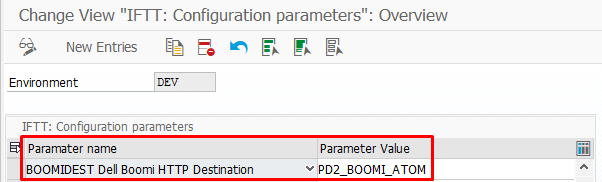
Boomi HTTP Destination
The first parameter is mandatory for the Int4 Suite to root the messages during test case execution properly. Click the button New entries and add the parameter “BOOMIDEST. “ As value for this parameter, provide the name of the RFC to the Boomi platform.
Boomi Dispatcher Direct endpoint
The second is mandatory when you are planning to use the Int4 Suite Dispatcher on the Boomi. Now, add the parameter “BOOMIDIS“. Finally, provide the Parameter Value according to the configuration of the Int4 Suite Dispatcher on the middleware.
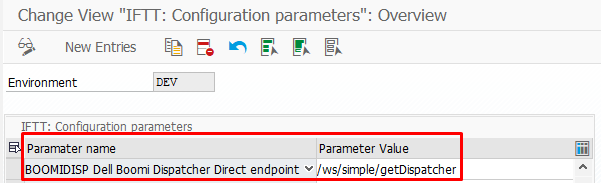
Please note that the Base URL for the request is retrieved from the RFC Destination configured under the “Boomi HTTP Destination“ global parameter.
Having completed these steps, you will be able to execute test cases from Int4 Suite. The messages will be sent correctly to the Int4 Suite Dispatcher, from where they will be routed accordingly to the proper processes.